
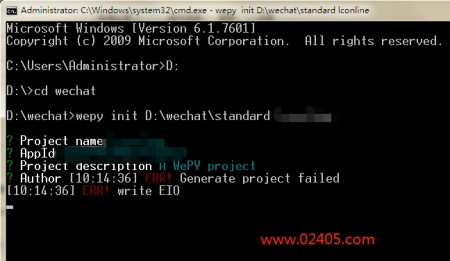
wepy2创建项目提示ERR! Generate project failed和ERR! write EIO两个错误: 解决办法:以管理员身份 运行 命令提示符。
wepy2创建项目提示ERR! Generate project failed和ERR! write EIO两个错误: 解决办法:以管理员身份 运行 命令提示符。
JavaScript通过toUpperCase()方法和toLowerCase()方法实现字符串的大小写转换,其中toUpperCase用于将小写字符转换为大写字符,toLowerCase用于将大写字符转换为小写字符。具体示例如下: 1.小写转
var str = www.02405.com;str = str.substr(1);console.log(str);//ww.02405.com
概述: visibility:hidden: The generated box is invisible (fully transparent, nothing is drawn), but still affects layout. Furthermore, descendants of the element will be visible if they have visibility: visible. 当 visibility:hidden 时,

方法一( 推荐 )、是将 potition:absolute 元素的 left 和 right 同时设置为 0,并且设置 margin:0 auto 。 !DOCTYPE htmlhtml lang=enhead meta charset=UTF-8 titlewww.02405.com/title/headstyle #root{ width: 100%; height: 1
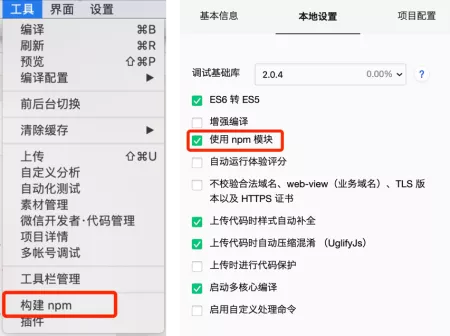
一、初始化npm。 在项目根目录下执行 npm init 命令,初始化项目,命令执行完毕后会在根目录下生成 package.json 文件。 注意:执行 npm init 命令后,不需要单独配置,全部回车一直到就可

微信小程序js获取或设置data中的参数值: //设置onChange(e) { this.setData({ name: 张三 });},//获取onShow() { console.log(this.data.name) //张三}
JS中使用new Date().Format(YYYY-mm-dd)提示Format is not a function,是因为format不是一个js内置函数,解决办法如下: 1.换其他方式实现该功能: new Date().toLocaleDateString().split(/).join(-); 2.下载并引用
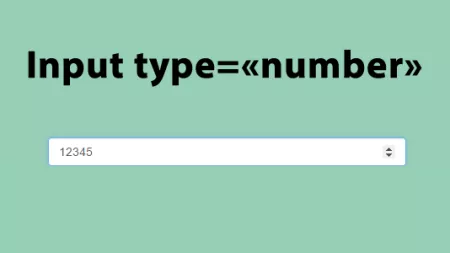
input标签type为number时允许输入小数的方法如下: input type=number step=0.01 / 在input标签中添加step属性,step属性可以控制input的上下切换范围,在这里我们通过step来达到input标签type为number时

首先引入 Jquery ,然后监听 Bootstrap Modal 的 hidden.bs.modal 事件即可,示例代码如下: $(#myModal).on(hidden.bs.modal, function (e) { // do something…}) 附:Bootstrap 3 模态框事件表 事件类型 描述 show.b
clipboard.js 一款使用现代方法将文本复制到剪贴板的js插件,不使用flash,最小仅3kb。
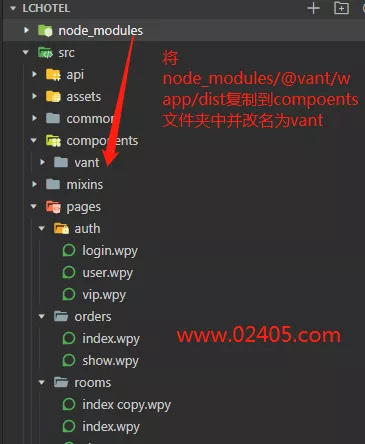
1.安装并创建一个wepy项目,通过微信开发者工具导入打开项目。详见: wepy文档:快速开始 。 2.在项目根目录下安装vant weapp组件库。详见: vant weapp文档:快速上手-步骤一 。 3.在项目

微信小程序wepy2框架使用vant weapp组件的方法参见: http://www.02405.com/ui/js_jquery/2038.html 。 在wepy2中引用vant wapp组件都很正常,但是在引用calendar日历组件时,无法正常显示日历。 经过检查
css中可以用position:absolute实现元素绝对定位,但是这个绝对定位是以document为参照物进行定位的。 如果要实现基于父级元素的绝对定位,那么要设置父元素的position为:relative,示例代码
moment().add(1, d);//明天moment().add(7, d);//一周之后
在微信小程序中判断对象是否为空可以使用Javascript ES6新增方法ES6 新增的方法Object.keys(): if (Object.keys(object).length === 0) { return false}return true
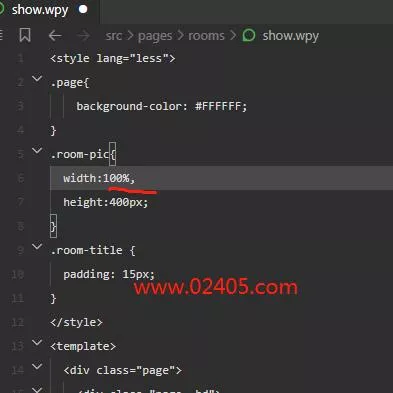
前端新手,今天在运行npm run dev打包项目时遇到错误:LESS ParseError: Unrecognised input …,产生错误的原因就是less代码有错误,检查你的less代码就可以了。我的错误特别小白,就是我把一个
jQuery同时存在 $().each 和 $.each() 两个写法相近的方法,它们的区别是前者用于处理DOM对象,后者用于处理数据对象。 方法结构 $().each: $(selector).each(function(index,element){…}); $.each(): $.
安装插件 yarn add less less-loader style-resources-loader vue-cli-plugin-style-resources-loader -D 新增 less 变量文件 // file variable.less@color: #fff; 调整 vue.config.js 文件 const path = require(path)module.exports = {plugi
var str = www.02405.com;console.log(str.indexOf(02405) != -1 );//true indexOf() 方法可返回某个指定的字符串值在字符串中首次出现的位置,如果要检索的字符串值没有出现,则该方法返回 -1。 注意: