
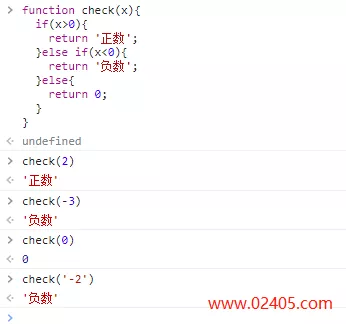
JS判断是正数还是负数: function check(x){ if(x0){ return 正数; }else if(x0){ return 负数; }}
JS判断是正数还是负数: function check(x){ if(x0){ return 正数; }else if(x0){ return 负数; }}
JS负数转正数函数:Math.abs(x)。示例如下: let x = -5;console.log(Math.abs(x));
function humandate(time1,time2){//var time1 = Date.parse(new Date()) / 1000;var s = time1 – time2;if(s0){s = Math.abs(s);}if(s 31536000) { return formatDate(new Date(time2 * 1000));} else if(s 2592000) { return parseInt(s / 2592000) + 月;}
// 自动伸缩,自动提交$(textarea).keyup(function(e) {if((e.ctrlKey (e.which == 13 || e.which == 10)) || (e.altKey e.which == 83)) { //Ctrl+Enter执行 return false;} if(e.which == 13){ //输入回车键 var h = $(this)[0].scrollHeig
JS判断是否存在指定函数方法: function isExitsFunction(funcName) { try { if (typeof(eval(funcName)) == function) { return true; } } catch(e) {} return false;}
JS判断是否存在指定变量函数: function isExitsVariable(variableName) { try { if (typeof(variableName) == undefined) { return false; } else { return true; } } catch(e) {} return false;}
禁止layer.msg()在回调时抖动需要设置 shift – 动画属性 : layer.msg(两秒后跳转, { shift: -1, time: 2000 }, function () { window.location.href = document.referrer;});
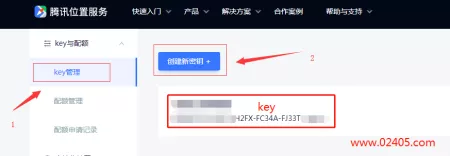
调用腾讯地图api时提示:鉴权失败,请传入正确的key,错误原因就是没有输入正确的key,解决办法如下: 1.到腾讯地图api官网注册账号并申请key。 注册网址:https://lbs.qq.com 2.调用腾讯
最近在使用JQuery中表单的seriazlize方法序列化元素ajax提交时,发现一个定义了display:none的元素并未被序列化,后台也无法获取。 在stackoverflow中找到了相同的问题,采纳的回复是: Seri
首先定义一个Greeter的类 class Greeter { greeting: string; constructor(message: string) { this.greeting = message; } greet() { return Hello, + this.greeting; }} 根据字符串动态创建Greeter类 //instance creation herevar greete
script type=text/javascript if(window.location.toString().indexOf(pref=padindex) != -1){}else{if(/AppleWebKit.*Mobile/i.test(navigator.userAgent) || (/MIDP|SymbianOS|NOKIA|SAMSUNG|LG|NEC|TCL|Alcatel|BIRD|DBTEL|Dopod|PHILIPS|HAIER|LENOVO|MOT
js计算两个日期之间相差多少天函数: function count(date1,date2){ var date1=new Date(date1) var date2=new Date(date2); var date=(date2.getTime()-date1.getTime())/(1000*60*60*24); return date;}var date = count(2018,1,1,2018,12,
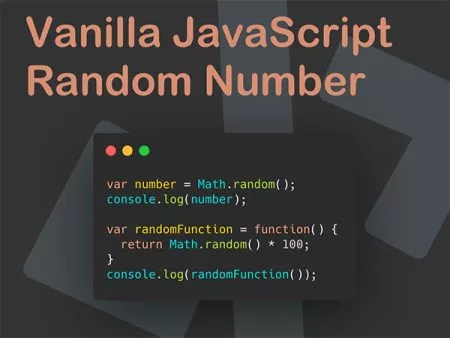
js生成0-1之间的随机小数: scriptvar rand = Math.random();alert(rand);/script js生成1-10之间的随机整数: scriptvar rand=Math.floor(Math.random()*10+1);alert(rand);/script js生成n位的随机整数: scriptfunction rand

js定时器有以下两个方法: setInterval() :循环定时器,按照指定的周期(以毫秒为单位)来调用函数或计算表达式。循环执行。 setTimeout() :倒计时定时器,在指定的时间(以毫秒为单位
js跳转页面的方法大全: 1.直接跳转到指定页面 script window.location.href=http://www.02405.com;/script 2.在新窗体中打开指定页面 script window.open(http://www.02405.com);/script 3.跳转到上一页(返回) sc
JQuery中提供的each方法可以很方便的进行遍历操作,比如获取网页中每一个li元素的文本: $(button).click(function(){ $(li).each(function(){ console.log($(this).text()); });}); 那么如果想在each的同时获取
JQuery动态修改onclick函数的参数值: html代码 div class=text-right id=btn-{$message.id}a class=btn btn-default btn-xs onclick=change({$message.id},{$message.status},0)删除/aa class=btn btn-default btn-xs onclick=change({$messa
JQuery判断input文本框的值是否为空代码: if($(#id).val()== $.trim($(#id).val()).length0){console.log(空);}

Ueditor是百度推出的富文本编辑器,有两个版本,一个是全功能版(简称UE),另一个是迷你版(简称UM)。初次使用的时候可能会报下面的错误: Uncaught ReferenceError: UE is not defined(UE版

js报错:window.location.href is not a function是由于写法问题以及浏览器不兼容导致的,具体解决方法如下: 错误js写法: window.location.href (http://www.02405.com/); 正确js写法: window.location.href = h